


Interface
Always design your UI to be the most comfortable for you; that’s the most important part. Some people play with the base WoW UI because it is what is comfortable for them. Others track every cooldown in the middle of the screen with action bars or addons. It is all personal preference.
This is an example of my UI:
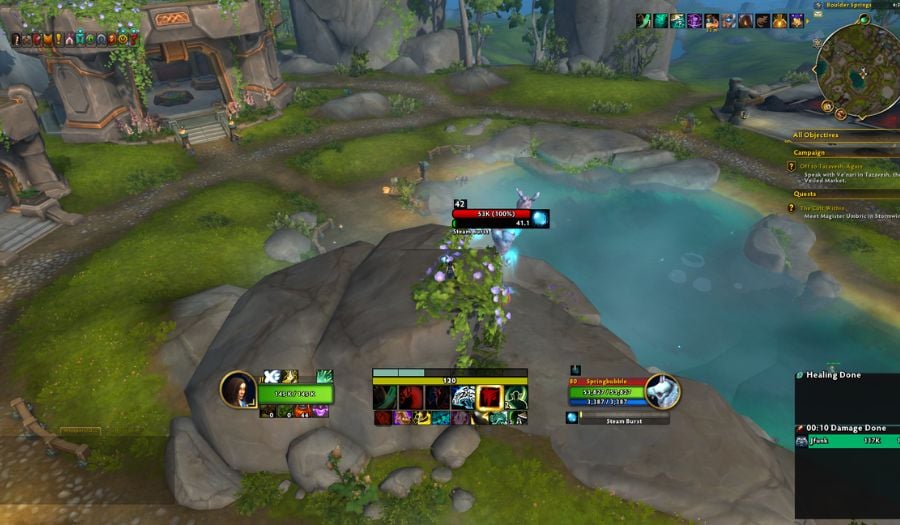
Recommended Addons:
- SenseiClassResourceBar: Provides a customizable resource bar complete with Chi and Energy. Additionally has automatic width control based on how many spells are on your Cooldown Manager.
- Platynator: An easy-to-use well made nameplate addon that is becoming a very popular replacement to Plater.
- Details!: Now functions as a skin to the default Blizzard damage meters, I prefer the way it looks.
- Masque: Combined with the diverse selection of skins allows you to skin aspects of your UI.
- Masque BlizzBars: Allows you to apply Masque Skins to the Cooldown Manager.
- Cooldown Manager Centered: Gives you the ability to change the behavior of your Cooldown Manager’s buffs. If you’re like me and you liked how Weakauras’ ‘Dynamic Groups’ sorted features instead of the Blizzard default then check this out.
- Opie: Allows you to create a radial menu with a custom keybind. I use this for my mounts but you can use it for pretty much everything else.
Macros
Don’t Clip Things
This macro will prevent you from pressing this button while channelling Fists Of Fury
#showtooltip Tiger Palm
/stopmacro [channeling:Fists of Fury]
/cast Tiger Palm
In this case, you would replace Tiger Palm with whatever ability you want to prevent clipping. I’d suggest your rotational buttons (Tiger Palm, Blackout Kick, and Rising Sun Kick).
Focus Macro
Windwalker has a number of spells you may want to target using the /Focus targeting option. You can replace the sample text in the macro below with spells such as Spear Hand Strike, Paralysis, or Detox, depending on your preference:
#showtooltip
/cast [@focus,exists] Sample Text